 AI Tattoos
Image to tattoo
Image to Tattoo: Turn Any Photo into a Tattoo Design
Upload any photo, your dog, a favorite memory, a place you love, and our AI turns it into an original, ink-ready tattoo design. This is a photo to tattoo converter that draws new art, not a filter.
Pet portraits done right
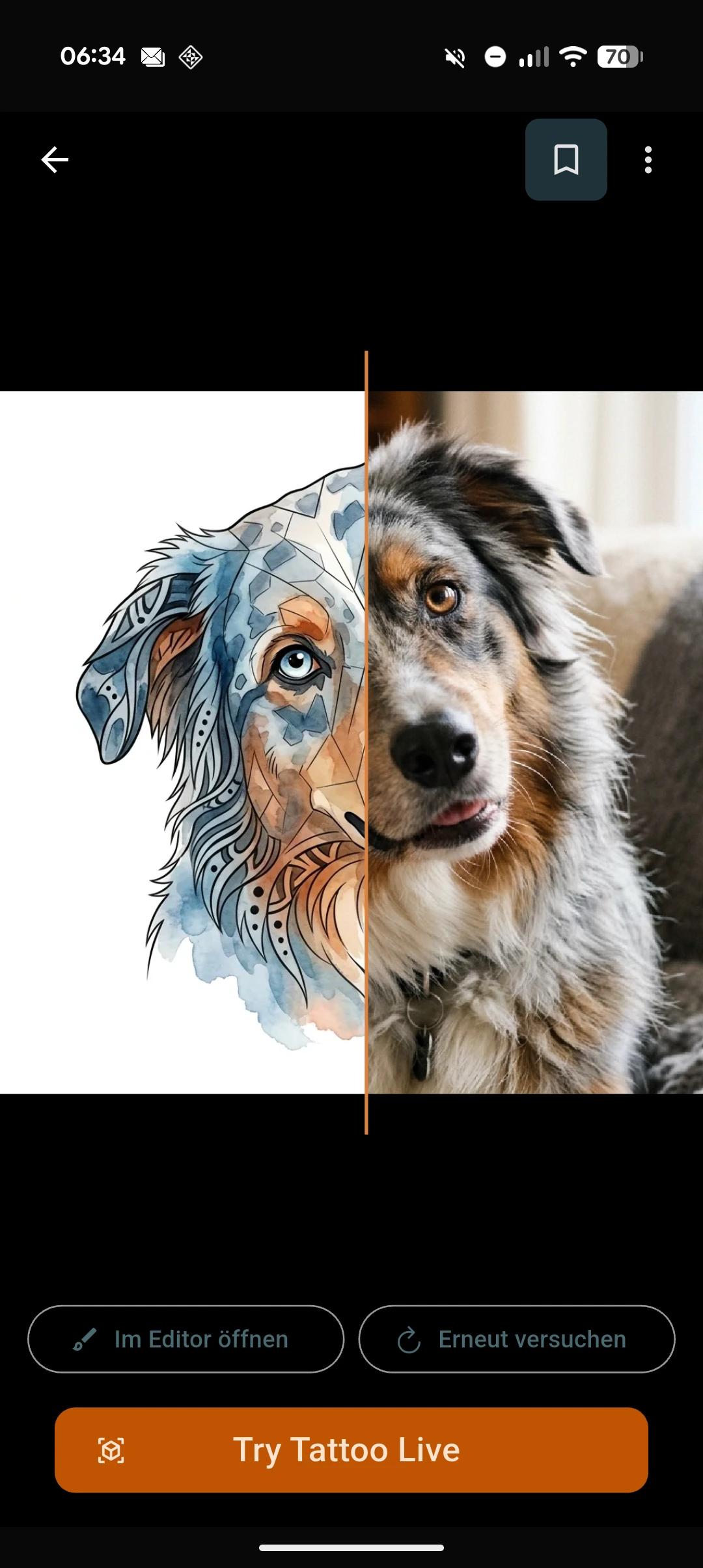
A dog tattoo from a phone photo is one of the most requested pieces we see, and it is where image to tattoo shines. Upload a clear shot of your pet and choose how you want it rendered: a bold Geometric cut of their silhouette, a soft Fine-Line portrait, or a Watercolor piece with loose washes of color. The same photo can also come back Black & Grey, Traditional, Illustrative, New School, or Tribal, whatever matches the rest of your ink.
It works for more than dogs. Cats, horses, birds, any pet or animal photo can become a custom tattoo from a photo, redrawn as real tattoo art rather than a stamped-down picture.
Memories, turned into ink
A photo to tattoo converter is also a way to carry a memory: a place you traveled, a moment with someone, a favorite object. Turn a picture into a tattoo and the AI extracts the subject, then redraws it as original linework or shading in the style you pick, so it reads as a tattoo on skin instead of a shrunken photograph. Some people use this for a memorial tattoo from a photo of someone they love; the app treats that the same way it treats any other image, respectfully redrawing the subject as a tattoo-ready design.
Either way, the result is new art generated from your photo, not a photo-filter effect laid over the original image.
What makes a photo work well
Image to tattoo works best with a clear subject and decent light: a photo where your dog, your object, or the scene is easy to make out, not blurry or cropped mid-motion. Simple backgrounds help the AI isolate the subject cleanly. If a first result does not feel right, restyle it with one tap and try a different style until it does.
How image to tattoo works
-
Pick a photo
Choose any picture from your camera roll, your dog, a memory, a place, anything with a clear subject.
-
AI redraws it as tattoo art
The AI extracts the subject and redraws it as original, ink-ready tattoo art in the style you choose.
-
Restyle and preview on skin
Not feeling it? Restyle with one tap. Then open tattoo try-on to preview the design on your own body photo.
Frequently asked questions
What kinds of photos work best?
Photos with a clear subject and decent light work best, a well-lit picture of your dog, a person, or an object with a simple background. Blurry or heavily cropped photos are harder for the AI to interpret.
Can I turn my pet's photo into a tattoo?
Yes. Upload a photo of your dog, cat, or any pet and the AI redraws it as an original tattoo design in the style you pick, from fine-line to watercolor to geometric.
Which styles can the design come out in?
Black & Grey, Fine-Line, Watercolor, Traditional, Geometric, Illustrative, New School, Lettering, and Tribal. You can restyle the same photo into a different look with one tap.
Can I see it on my skin first?
Yes. Every design generated from your photo can be previewed with tattoo try-on, so you see it placed on your own body photo before you decide anything.
Is it free?
AI Tattoos is free to download, with in-app purchases available.
Does it work on iPhone and Android?
Yes. AI Tattoos is available on both the App Store and Google Play.
Your photo, reborn as ink
Upload a picture, get an original tattoo design, and try it on your own body photo before you decide.